
Launching a successful marketing campaign for your online course or for your Business involves strategic planning and effective execution, especially when it comes to email marketing. One crucial aspect that can significantly impact your campaign’s success is ensuring your emails reach the intended recipients’ inboxes. This is where Enhanced Email Verification from HighLevel can play a pivotal role.
What is Enhanced Email Verification?
Email Verification from HighLevel is a feature designed to validate the accuracy and deliverability of the email addresses you target in your campaigns. By verifying email addresses, you can ensure that your promotional emails are sent only to valid recipients, thereby increasing engagement rates and maximizing conversions.
️Why Does Email Verification Matter To Your Business?
Here are the key benefits of using Email Verification for your marketing campaigns:
- Improved Deliverability: Ensure your emails reach valid and active email addresses, reducing bounce rates and increasing the chances of engagement.
- Enhanced Reputation: Maintain a high sender reputation by avoiding spam traps and sending emails only to verified contacts.
- Cost Efficiency: Save valuable time and resources by focusing your email campaigns on verified and engaged recipients, improving overall campaign effectiveness.
How To Use Email Verification for Campaigns from HighLevel
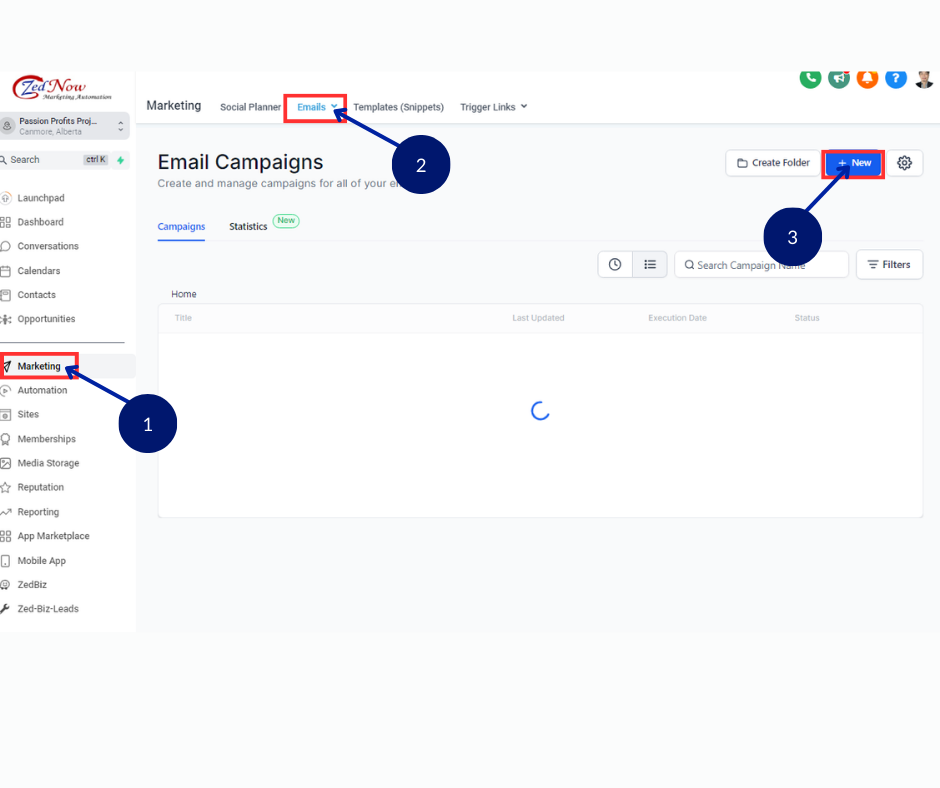
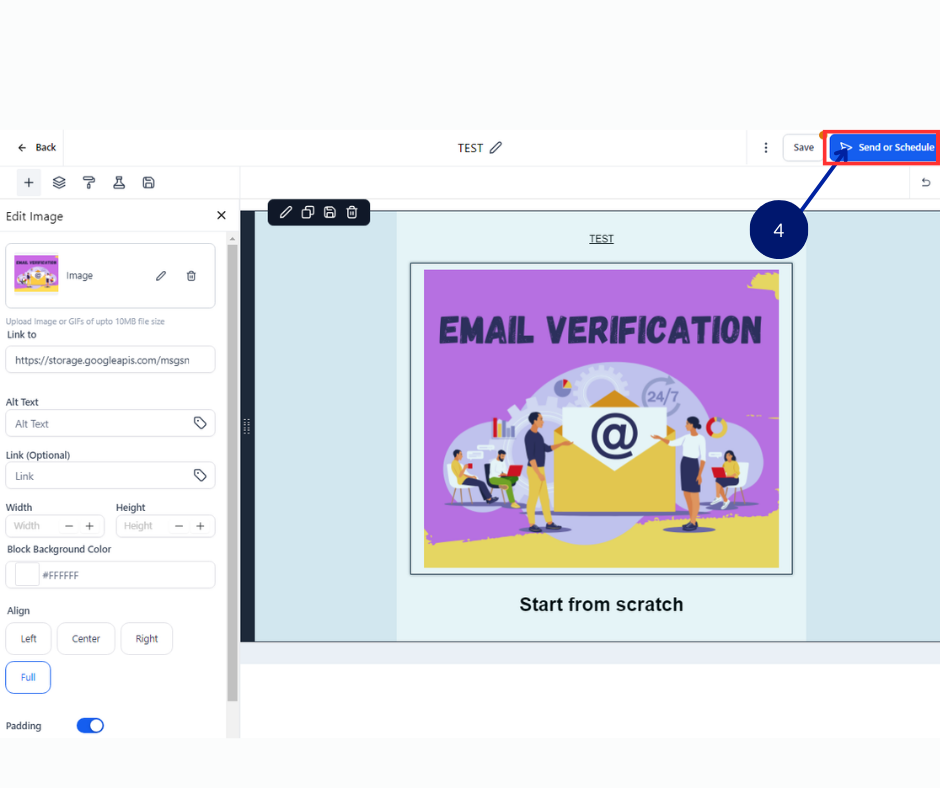
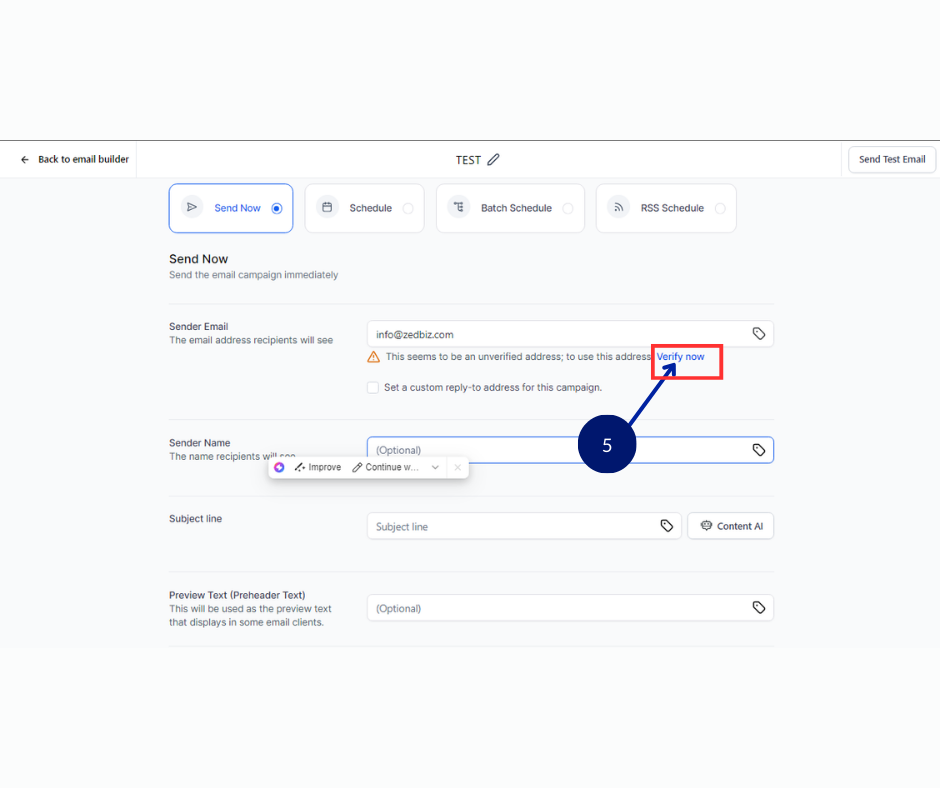
To leverage Email Verification effectively for your marketing campaigns, follow these simple steps within the HighLevel platform:
- Access the Marketing Tab:
- Navigate to the “Marketing” tab from the left navigation menu in your HighLevel dashboard.
- Navigate to Email Campaigns:
- Click on Email > Campaigns from the upper navigation menu to create a new campaign or edit an existing one.
- Send or Schedule Your Campaign:
- Once your campaign is ready, click on the Send or Schedule button from the top right corner.
- Verify Sender Email:
- Enter the email address you wish to verify in the sender email field and click on the “Verify Now” option.
- Enter OTP (One-Time Password):
- Check your email for the OTP sent by HighLevel, enter the 6-digit OTP into the verification prompt, and click verify.
- Confirmation:
- Once verified, your email address is now validated and ready for use in your campaigns.
Additional Verification Method:
Alternatively, you can also verify email addresses through the following steps:
- Go to Email > Campaigns and click on the Settings Icon.
- Select Verify Sender Email and click on + Verify an Email button to initiate the verification process.
Benefits of Using Email Verification in HighLevel
Implementing Email Verification within HighLevel empowers your marketing efforts in several ways:
- Precision Targeting: Ensure your messages reach the right audience, enhancing the effectiveness of your campaigns.
- Compliance: Maintain compliance with email marketing regulations by ensuring you send emails only to opted-in and verified contacts.
- Campaign Optimization: Improve campaign performance metrics such as open rates and click-through rates by focusing on engaged recipients.
Conclusion
Integrating Enhanced Email Verification from HighLevel into your email marketing strategy can significantly boost your campaign’s success by optimizing deliverability, enhancing sender reputation, and maximizing resource efficiency. By verifying email addresses, you lay a solid foundation for more effective and targeted communication with your audience, ultimately driving better results for your online course marketing efforts.