

Hey there! 👋 Do you know what a GoHighLevel Community is? Well, it’s like a super cool club where you and your friends can hang out and talk about all sorts of stuff! Let’s dive in and learn how you can make your GoHighLevel Community the best it can be!
Adding Branding and Links 🌟
First things first, let’s make your community look awesome! You can add your own logo and pictures to make it feel like home. Plus, you can choose colors that match your style. Cool, right? Oh, and don’t forget to add links to special offers so your friends can check them out!
Creating Chat Channels 💬
Next up, let’s organize the chats! Instead of everyone talking in one big group, you can create different channels for different topics. Like talking about games, homework help, or funny jokes! It’s like having different rooms for different conversations. Easy peasy!
Posting and Commenting ✍️
Now, let’s talk about posting and commenting. It’s just like using social media! You can write messages, share pictures, and even use emojis! And if you see something you like, you can give it a thumbs up. Plus, you can reply to messages to keep the conversation going!
Linking Communities to Courses 🔗
Wow, did you know you can link your community to cool courses? Imagine being able to talk about what you’re learning with your friends! It’s like having a study group online. So cool! And if there’s a new course, you’ll already have friends to share it with!
Assigning User Roles 👩💼
Last but not least, let’s talk about user roles. Basically, it’s like giving out special jobs to your friends. Some can help keep things tidy by deleting comments, while others can make big changes to the community. Everyone has a role to play!
How to Set Up Your Community 🚀
Setting up your community is easy! Just follow these steps:
- Log into GoHighLevel and create a group.
- Add a name, description, and some cool pictures.
- Create different channels for different topics.
- Customize your community settings.
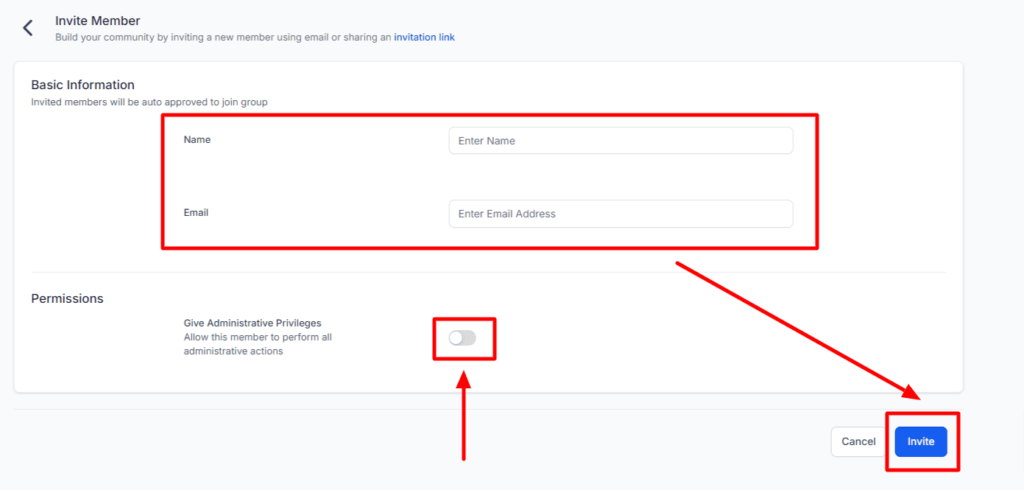
- Invite your friends to join the fun!
- Inviting Friends 💌
To invite your friends, just click the “Invite” button and share the link with them. Easy as pie!
And that’s it! Now you know how to make your GoHighLevel Community awesome! So gather your friends, start chatting, and have a blast!